
Founder and editor of We Are MacWise, with more than 30 years of Apple-focused IT experience helping professionals and small businesses.
Key Takeaways
- Apple Vision Pro starts at $3,499 and runs visionOS, Apple’s dedicated spatial computing platform.
- The display system uses micro-OLED panels delivering approximately 23 million pixels across both eyes.
- Battery life is approximately two hours on the external pack; it can run indefinitely when plugged in.
- The headset works as a standalone computer powered by M2 and R1 chips — no iPhone or Mac required.
- Prescription optical inserts are available through Zeiss but sold separately.
- It is not a gaming device by design; productivity, media consumption, and creative work are the primary use cases.
- visionOS 2 brought meaningful improvements, including spatial photos from standard iPhone images.
- Most readers who should wait are those without a clear, specific use case that justifies the cost.
What Exactly Is Apple Vision Pro, and How Does It Differ From Other Headsets?
Apple Vision Pro is a spatial computer — Apple’s term, and a deliberate one. Unlike VR headsets that replace your environment entirely, or AR glasses that overlay simple graphics on the world, Vision Pro blends virtual content with a live video passthrough of your physical surroundings. You see the real room around you, rendered in real time via external cameras, with digital windows, apps, and media layered into that space.
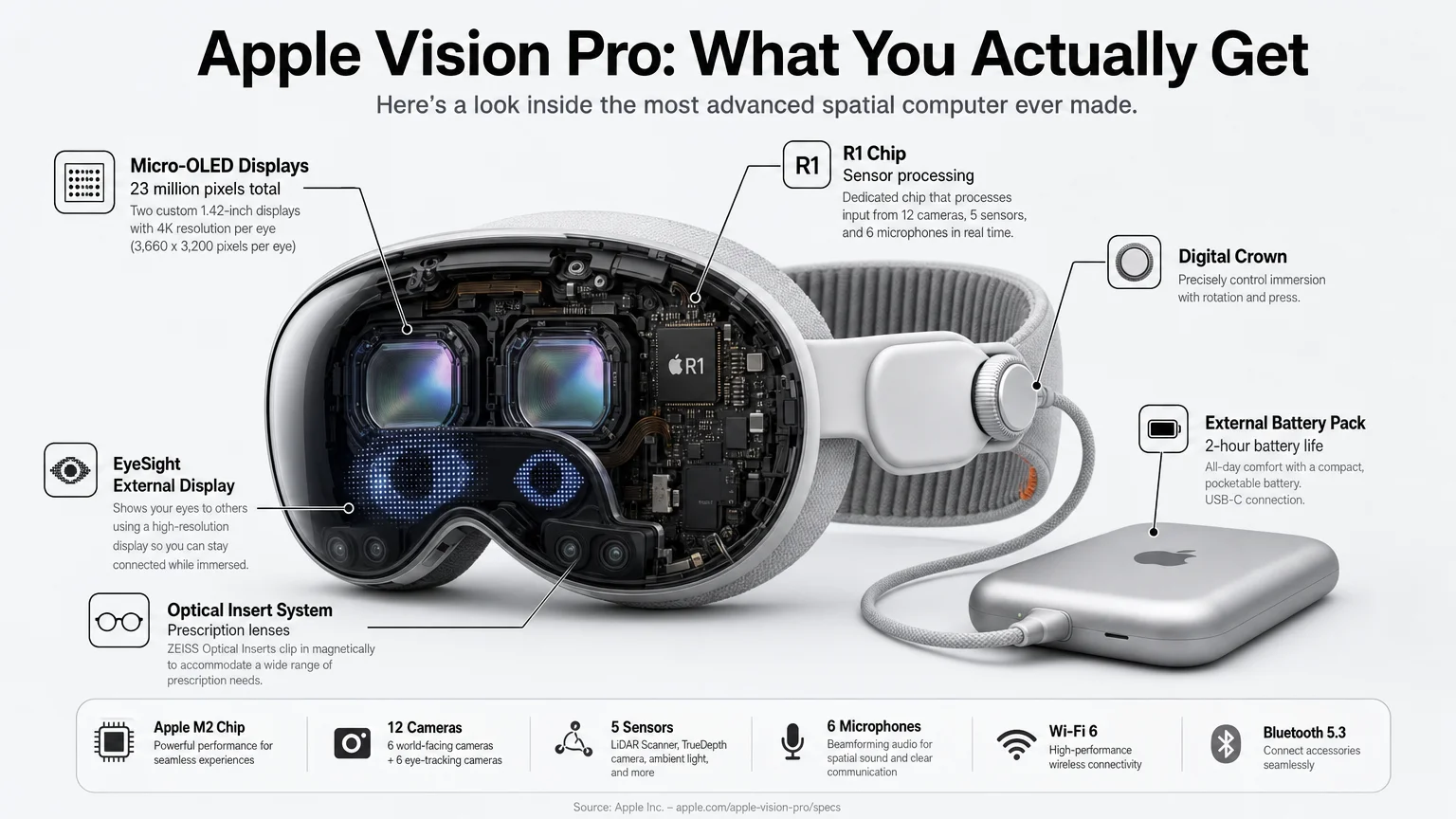
The hardware distinction matters. Vision Pro runs on Apple’s M2 chip for general computing tasks and the R1 chip, which processes sensor, camera, and microphone input with extremely low latency to prevent motion sickness. The display system uses Sony micro-OLED panels — two of them — delivering a combined pixel count of approximately 23 million. By comparison, a 4K television displays roughly 8 million pixels. The result is text that reads cleanly at comfortable distances, which is not a given on competing headsets. The EyeSight feature, which displays a representation of your eyes on the outer lens, signals to people nearby whether you are present or immersed. It is a social consideration no other headset has addressed in the same way.
Is Apple Vision Pro Worth the $3,499 Starting Price?
This is the question readers ask most, and the honest answer depends entirely on what you need it to do. For a professional who travels frequently and wants to replace a multi-monitor setup with a portable virtual workspace, the value proposition is real. For someone curious about spatial computing without a defined workflow, $3,499 is very difficult to justify.
The price also includes meaningful compromises. The external battery lasts roughly two hours, which limits untethered use. The headset weighs approximately 600 grams, which is noticeable during extended sessions. And the app ecosystem, while growing, does not yet match the depth of the Mac or iPad. If you are evaluating this as a buying decision, our Buying Guides section covers the practical framework for assessing Apple hardware investments at various price points.
Who Is Apple Vision Pro Actually Designed For?
Apple has been consistent in positioning Vision Pro as a productivity and creative tool, not a consumer entertainment device. The clearest use cases that emerge from real-world reporting include:
- Remote professionals who need multiple virtual screens in a single portable package.
- Video editors and 3D artists who benefit from the high-resolution display and spatial canvas.
- Developers building visionOS applications and needing direct access to the platform.
- Enterprise teams exploring spatial workflows in architecture, medical imaging, and training simulations.
- Media enthusiasts who want an immersive cinema experience for long-haul travel.
The device is less suited to casual gaming (the controller-free input model is elegant but not optimized for fast-paced games), social VR platforms, or general-purpose daily computing for someone already well-served by a Mac and iPad combination.
How Comfortable Is It to Wear for Extended Periods?
Comfort is the most consistent concern raised by readers who have tried Vision Pro. The headset uses a dual-loop band system — a Solo Knit Band and a Dual Loop Band are both included — and fit affects both comfort and display quality significantly. A poor fit causes light leakage and eye strain.
Most reviewers report that sessions beyond 90 minutes become noticeably fatiguing, primarily due to weight distribution rather than display issues. Apple has released additional band options, and third-party accessories have expanded the choices further. For readers with prescription requirements, Zeiss optical inserts are the supported solution; they clip magnetically into the frame and are priced separately based on prescription complexity. This is worth factoring into total cost calculations.
What Can visionOS Actually Do in 2026?
visionOS has matured considerably since the initial release. The platform supports a growing library of native spatial apps, full compatibility with iPad apps running in a flat window format, and integration with the broader Apple ecosystem including Continuity Camera, AirPlay, and iCloud. SharePlay works in Vision Pro, allowing shared viewing experiences with other Apple users.
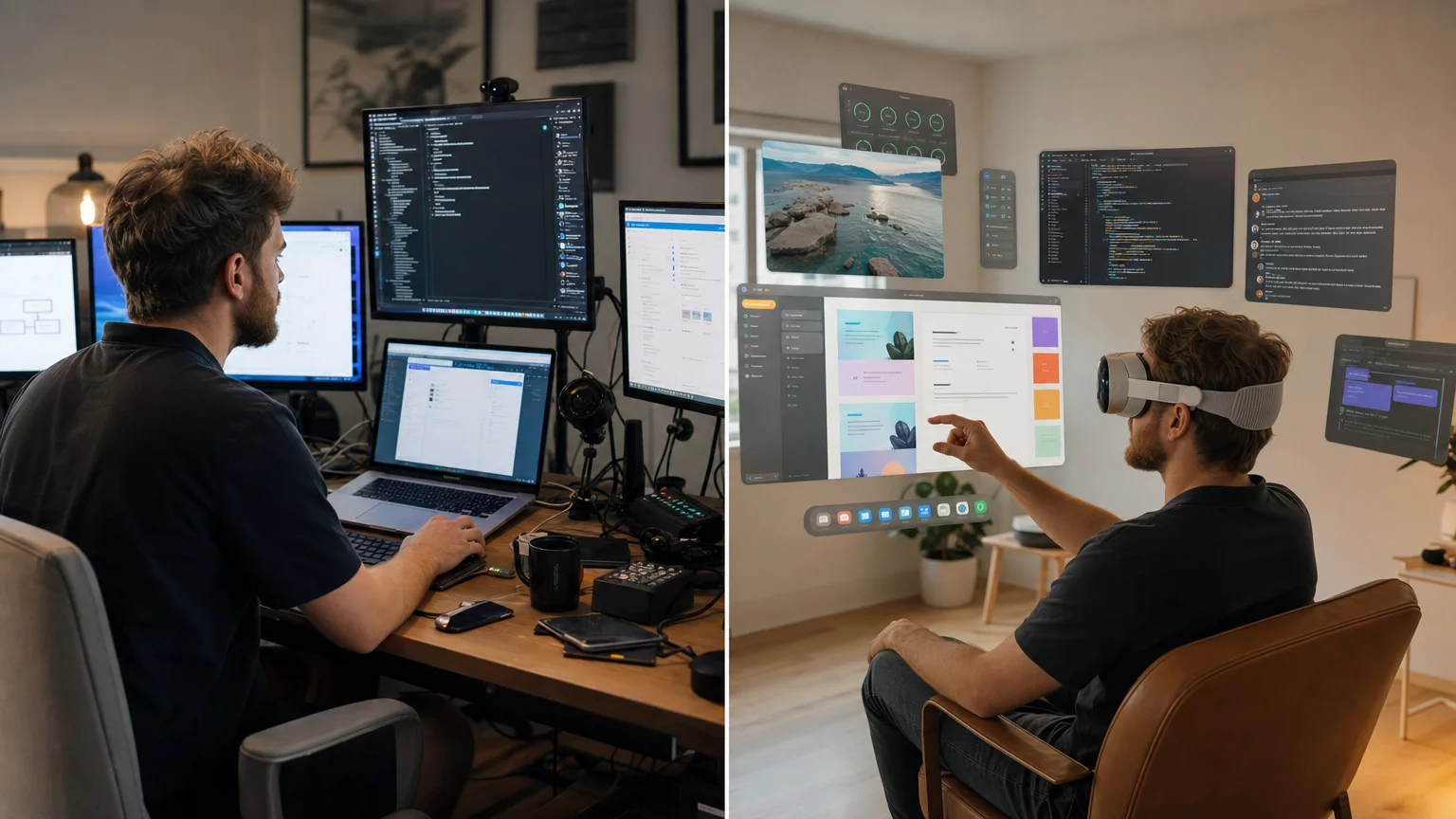
Practically, the most common workflows involve using Vision Pro as an extended display environment — opening Safari, Mail, Notes, and productivity apps across a wide virtual space — alongside dedicated spatial experiences like the Mindfulness app, Apple Immersive Video content, and third-party spatial tools. Microsoft 365 apps are available natively. The Files app, combined with iCloud Drive, makes document access straightforward. For readers interested in how visionOS fits into broader Apple software strategy, the Apps & Workflows section covers this in more depth.
How Does Apple Vision Pro Connect to the Rest of the Apple Ecosystem?
Integration with existing Apple devices is one of Vision Pro’s genuine strengths. Mac Virtual Display allows you to mirror or extend your Mac screen into Vision Pro as a large virtual monitor — useful for Mac-dependent professionals who want more screen real estate without buying additional displays. iPhone mirroring is not currently supported in the same way, but AirPlay from iPhone and iPad works reliably for media.
Apple ID, iCloud, and Handoff all function as expected. If you use a Mac as your primary computer, the transition into Vision Pro for specific tasks feels relatively natural. The Apple News & Analysis section tracks platform-level updates as visionOS evolves.
What Are the Biggest Limitations Readers Should Know Before Buying?
A direct answer: the limitations are real and worth naming clearly.
| Limitation | Detail |
|---|---|
| Battery life | ~2 hours on external battery; must be plugged in for longer sessions |
| Weight | ~600g; heavier than most competing headsets |
| App ecosystem | Growing but not yet comparable to Mac or iPad |
| Social use | Isolating by design; EyeSight helps but does not fully solve the problem |
| Price | $3,499 base; optical inserts, AppleCare+, and accessories add to total cost |
| Prescription support | Requires Zeiss inserts; not included in base price |
None of these are dealbreakers for the right buyer. But readers who purchase Vision Pro expecting it to replace their Mac entirely, or expecting a two-year-old app ecosystem, will be disappointed. For accessory and peripheral considerations, the Accessories & Gear section covers compatible hardware.
Frequently Asked Questions
Does Apple Vision Pro require an iPhone or Mac to work?
No. Apple Vision Pro is a standalone spatial computer powered by the M2 and R1 chips. It operates independently without needing an iPhone or Mac nearby, though it integrates with both when they are available.
Can you use Apple Vision Pro with glasses?
Not directly. The headset requires Zeiss optical inserts for users who need vision correction. These are prescription-specific and purchased separately through Apple’s ordering process.
Does Apple Vision Pro work with non-Apple apps?
Yes. iPad apps run on Vision Pro in a flat window format without modification. Developers can also build native visionOS apps with full spatial capabilities. Many major productivity and utility apps are available.
How long does the battery last?
The included external battery provides approximately two hours of use. The headset can run indefinitely when connected to a power source via the battery cable.
Is Apple Vision Pro suitable for gaming?
It supports some games, but it is not designed as a gaming platform. The input system — eye tracking, hand gestures, and voice — is well-suited to productivity and media but not optimized for the fast, precise inputs most games require.
What is the return policy if it does not work for me?
Apple’s standard return window applies. Given the price, it is worth visiting an Apple Store for a hands-on demo before purchasing, as fit and comfort are highly individual.
Will there be a cheaper Apple Vision Pro model?
Apple has not officially confirmed a lower-cost model, though industry reporting has consistently suggested one is in development. No confirmed release date or price exists as of 2026.
Is the content library large enough to justify the purchase?
For media consumption, Apple Immersive Video and compatible streaming apps provide a compelling experience. For productivity, the library is functional but still growing. The honest answer is that content depth alone does not justify the price — a clear workflow need should drive the decision.
Final Thoughts
Apple Vision Pro is a serious piece of hardware designed for a specific kind of buyer. The questions readers ask most — about price, comfort, use cases, and ecosystem fit — all point to the same underlying concern: whether this device solves a real problem for the person considering it. For professionals with defined spatial computing needs, it does. For everyone else, patience and a clear use case are the better strategy.
If you are still working through the decision, the Buying Guides section offers structured frameworks for evaluating Apple hardware at any price point. For ongoing visionOS coverage and platform news, subscribe to stay current as the ecosystem develops.
Frequently Asked Questions
Does Apple Vision Pro require an iPhone or Mac to work?
No. Apple Vision Pro is a standalone spatial computer powered by the M2 and R1 chips. It operates independently without needing an iPhone or Mac nearby, though it integrates with both when they are available.
Can you use Apple Vision Pro with glasses?
Not directly. The headset requires Zeiss optical inserts for users who need vision correction. These are prescription-specific and purchased separately through Apple's ordering process.
Does Apple Vision Pro work with non-Apple apps?
Yes. iPad apps run on Vision Pro in a flat window format without modification. Developers can also build native visionOS apps with full spatial capabilities. Many major productivity and utility apps are available.
How long does the battery last?
The included external battery provides approximately two hours of use. The headset can run indefinitely when connected to a power source via the battery cable.
Is Apple Vision Pro suitable for gaming?
It supports some games, but it is not designed as a gaming platform. The input system — eye tracking, hand gestures, and voice — is well-suited to productivity and media but not optimized for the fast, precise inputs most games require.
What is the return policy if it does not work for me?
Apple's standard return window applies. Given the price, it is worth visiting an Apple Store for a hands-on demo before purchasing, as fit and comfort are highly individual.
Will there be a cheaper Apple Vision Pro model?
Apple has not officially confirmed a lower-cost model, though industry reporting has consistently suggested one is in development. No confirmed release date or price exists as of 2026.
Is the content library large enough to justify the purchase?
For media consumption, Apple Immersive Video and compatible streaming apps provide a compelling experience. For productivity, the library is functional but still growing. The honest answer is that content depth alone does not justify the price — a clear workflow need should drive the decision.
Founder and editor of We Are MacWise, with more than 30 years of Apple-focused IT experience helping professionals and small businesses.
