
Founder and editor of We Are MacWise, with more than 30 years of Apple-focused IT experience helping professionals and small businesses.
Apple’s extended warranty program covers everything from cracked screens to battery degradation — but at prices ranging from under $4 a month to nearly $25, the value calculation looks very different depending on which device you own. This AppleCare+ cost breakdown examines what each plan actually costs, what it covers, and whether the math works in your favor.
Key Takeaways
- AppleCare+ pricing varies significantly by device, from $3.99/month for AirPods to $24.99/month for MacBook Pro and Apple Vision Pro.
- All plans include unlimited accidental damage incidents, subject to a service fee per incident.
- Battery replacement is covered when capacity drops below 80% — a meaningful benefit for heavy iPhone users.
- For high-end Macs and Apple Vision Pro, AppleCare+ is easier to justify; for lower-cost accessories, the math is tighter.
- Monthly subscriptions can be cancelled, but upfront plans offer a modest discount over two years.
- AppleCare+ with Theft and Loss is only available for iPhone and adds roughly $3–4/month to the base plan.
- Third-party repair costs are the most important variable — know your out-of-pocket exposure before deciding.
What Does AppleCare+ Actually Cover?
AppleCare+ extends the standard one-year limited warranty to two years (or provides ongoing coverage on a monthly plan) and adds two key protections the base warranty excludes: accidental damage and battery service. Each accidental damage incident carries a service fee — $29 for screen damage on most iPhones, $99 for other accidental damage on iPhones, and higher tiers for Macs and iPads. The standard Apple warranty covers manufacturing defects only, so a dropped phone or a liquid-damaged MacBook falls entirely outside it.
The program also includes 24/7 priority access to Apple support, which has real value for professionals who depend on their devices for income. Express Replacement Service — where Apple ships a replacement device before you return the damaged one — is included for iPhone and select other products.
AppleCare+ Cost Breakdown by Device in 2026
The pricing below reflects Apple’s current plans as of 2026. Monthly figures are for the subscription option; upfront figures cover two years of coverage.
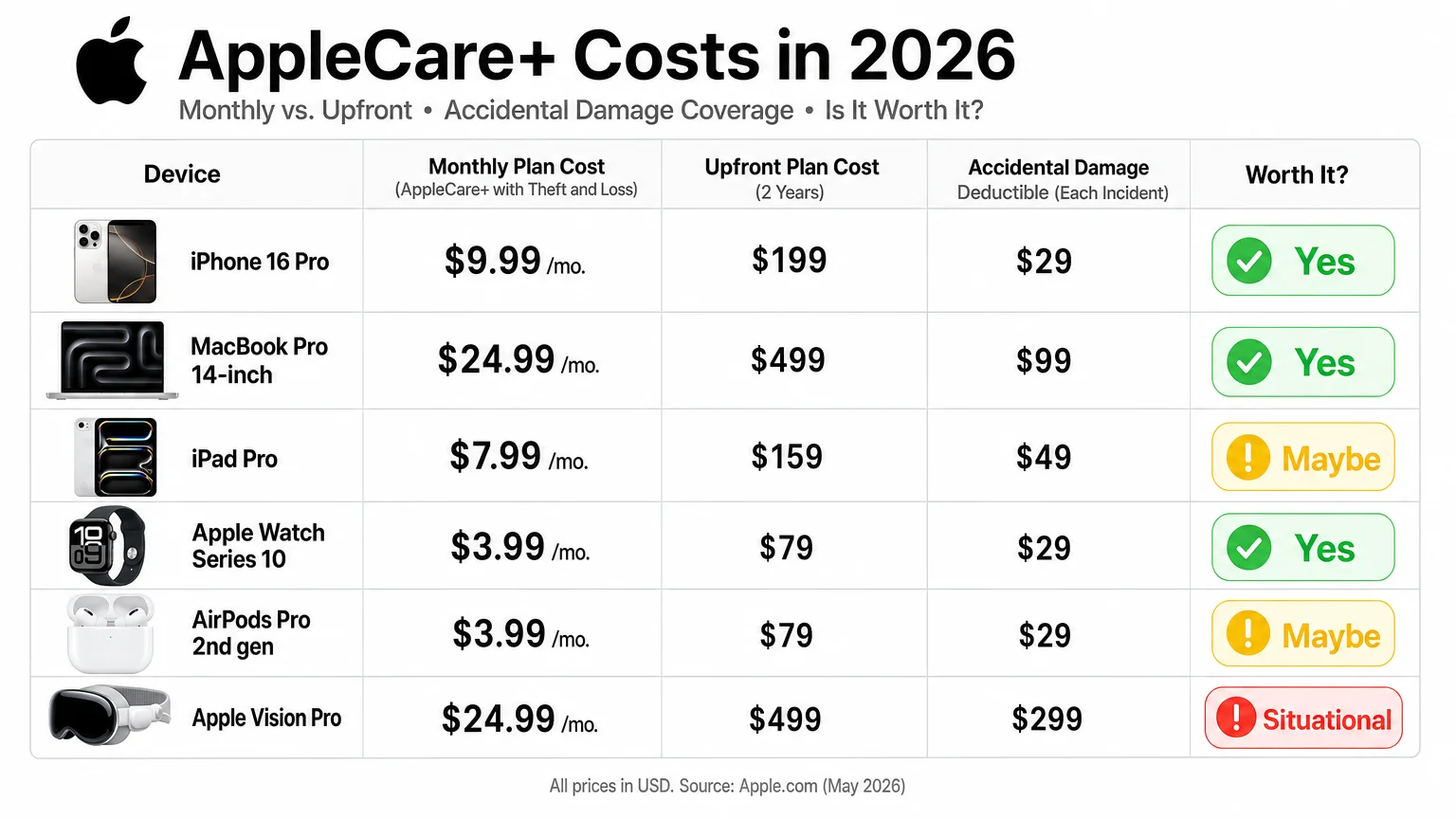
| Device | Monthly Plan | 2-Year Upfront | Accidental Damage Fee |
|---|---|---|---|
| iPhone 16 Pro / Pro Max | $9.99/mo | $199 | $29 (screen) / $99 (other) |
| iPhone 16 / 16 Plus | $7.99/mo | $149 | $29 (screen) / $99 (other) |
| MacBook Pro 14” / 16” | $24.99/mo | $399 | $99–$299 depending on damage |
| MacBook Air | $12.99/mo | $249 | $99–$299 |
| iPad Pro (M4) | $7.99/mo | $149 | $49 (screen) / $99 (other) |
| Apple Watch Series 10 | $3.99/mo | $79 | $69 |
| Apple Watch Ultra 2 | $7.99/mo | $149 | $69 |
| AirPods Pro (2nd gen) | $3.99/mo | $29 (upfront only) | $29 |
| Apple Vision Pro | $24.99/mo | $499 | $299–$799 |
Prices are subject to change. Always verify current pricing at apple.com before purchasing.
Is AppleCare+ Worth It for iPhone?
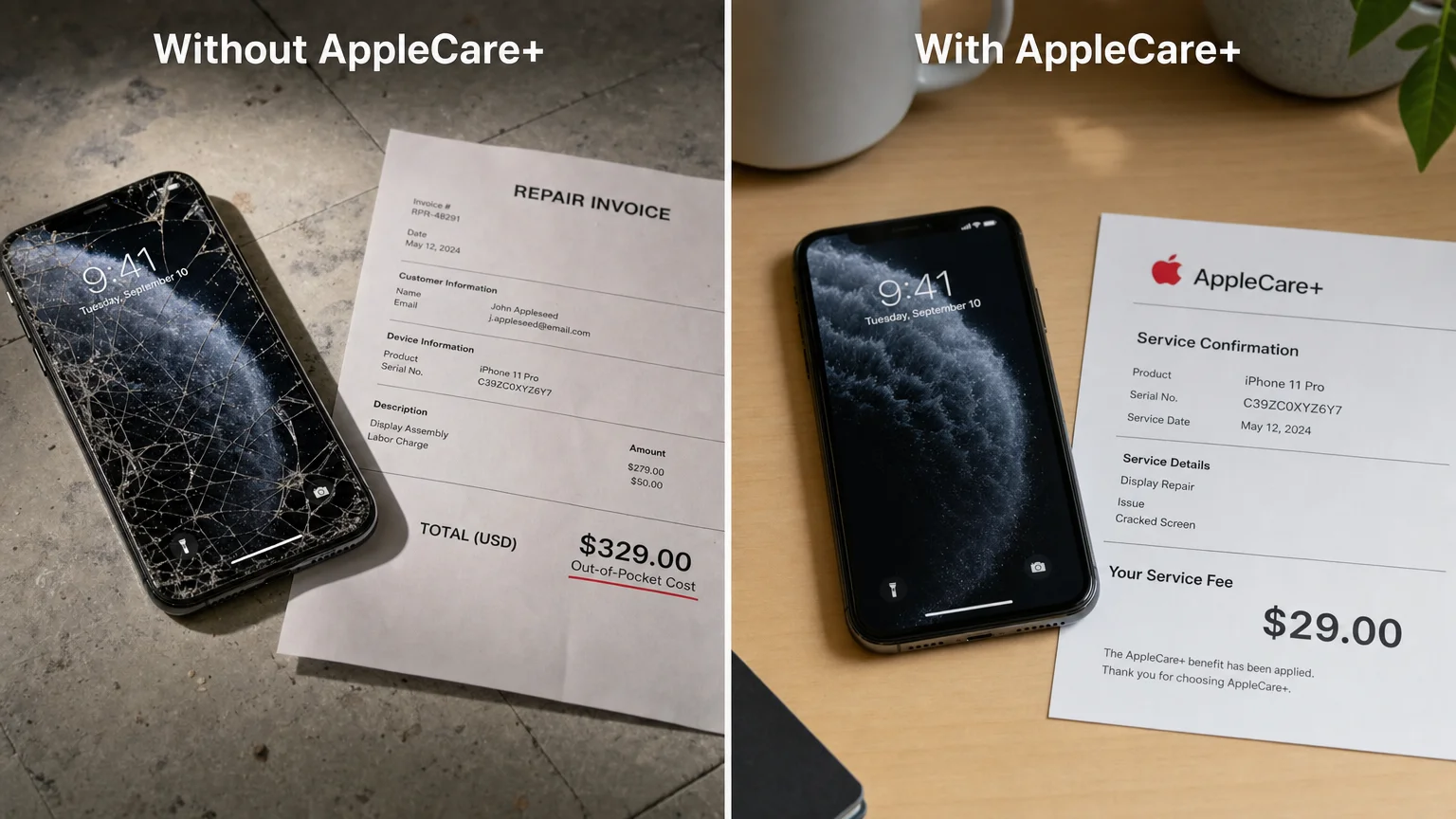
For most iPhone users, AppleCare+ delivers clear value — particularly on Pro models. An out-of-warranty screen replacement for an iPhone 16 Pro costs $329 through Apple. With AppleCare+, that same repair costs $29. A single screen replacement in two years more than covers the cost of the plan on any current iPhone model.
The Theft and Loss add-on (available only for iPhone) pushes the monthly cost to roughly $13–$14 for Pro models, which is harder to justify unless you have a documented history of losing devices. Standard homeowner’s or renter’s insurance sometimes covers theft at lower deductibles — worth checking before adding this tier.
Battery coverage is the quieter benefit. iPhone batteries typically degrade past the 80% threshold within two to three years of regular use, and a battery replacement without AppleCare+ costs $99 through Apple. For users who keep their phones for three or more years on a monthly plan, this alone can offset a significant portion of the cost.
If you’re setting up a new iPhone and want to understand the full ecosystem of decisions involved, our guide on how to set up a new iPhone the right way from day one walks through the choices worth making early — including protection options.
Is AppleCare+ Worth It for Mac?
The answer here depends heavily on which Mac you own and how you use it. For a MacBook Pro used in a professional context — video editing, software development, design work — the justification is strong. A single logic board replacement on a MacBook Pro can run $600–$900 out of warranty. The $399 two-year upfront plan, combined with a $99–$299 accidental damage fee, still represents meaningful savings in a worst-case scenario.
For MacBook Air users, the calculation is closer. The Air is a more affordable machine, and its repair costs, while not trivial, are lower. Users who work primarily at a desk and rarely travel with their laptop face lower accidental damage risk, which shifts the math against the plan.
Desktop Macs — Mac mini, Mac Studio, Mac Pro — are rarely dropped or liquid-damaged, which removes the most common claim scenario. For those machines, AppleCare+ is primarily a bet on hardware failure within the coverage window. Statistically, Apple silicon Macs have shown strong reliability, though the data on long-term failure rates for M3 and M4 chips is still accumulating.
For teams evaluating Mac purchases at scale, our piece on how a 10-person design studio moved to Apple Silicon touches on how professional environments weigh device protection alongside total cost of ownership.
Is AppleCare+ Worth It for iPad?
iPad occupies a middle ground. The iPad Pro (M4) starts at $999, making it a significant investment, and screen repairs without coverage can exceed $400. For a device that travels to meetings, studios, or job sites, AppleCare+ at $7.99/month is reasonable insurance. The $49 screen damage fee is notably low compared to other devices.
For the standard iPad or iPad mini, the calculus shifts. A base iPad starts at $349, and its repair costs are proportionally lower. Buying a quality case and screen protector — total cost perhaps $50–$80 — may offer more practical protection than a multi-year plan for users who are careful with their hardware.
Creative professionals who rely on Apple Pencil and keyboard accessories should also note that AppleCare+ does not cover accessories purchased separately unless those accessories have their own coverage.
For those investing in iPad accessories at a professional level, see our roundup of best iPad accessories for creative professionals 2026 for context on the broader investment.
Is AppleCare+ Worth It for Apple Watch and AirPods?
At $3.99/month, AppleCare+ for Apple Watch Series 10 costs roughly $96 over two years. A cracked Apple Watch display costs $199–$299 to replace out of warranty, so a single incident justifies the plan. For active users — runners, swimmers, people who work with their hands — the risk profile supports coverage.
Apple Watch Ultra 2 owners have a stronger case still. The device costs $799, and its repair costs reflect that. If you’re comparing watch options and weighing long-term costs, our analysis of Apple Watch Ultra 2 vs. Series 10 covers the broader value question.
AirPods Pro coverage at $29 upfront for two years is almost always worth it. The fee is low enough that it requires minimal justification — a single lost earbud replacement without coverage runs $89 per bud.
Should You Buy AppleCare+ Monthly or Upfront?
Monthly plans offer flexibility — you can cancel after the first year if you sell the device or decide the coverage isn’t needed. Upfront plans offer a modest discount: roughly 10–15% less than paying monthly for two years. The upfront option also transfers with the device if you sell it, which can add resale value.
For devices you plan to keep long-term, upfront coverage makes financial sense. For devices you might upgrade within a year — particularly iPhones on annual upgrade cycles — the monthly plan preserves optionality without locking in the full cost.
What AppleCare+ Does Not Cover
Understanding the exclusions is as important as understanding the benefits. AppleCare+ does not cover:
- Cosmetic damage that does not affect device function (scratches, dents)
- Damage caused by modifications or non-Apple repairs
- Loss or theft (unless the Theft and Loss tier is purchased for iPhone)
- Accessories not sold directly with the device
- Damage from intentional misuse
It also does not cover devices purchased outside the eligible enrollment window — typically 60 days from the original purchase date, though Apple sometimes allows enrollment via mail-in inspection.
The Bottom Line
The AppleCare+ cost breakdown reveals a program that delivers genuine value for some devices and marginal value for others. High-end iPhones, MacBook Pros, and Apple Vision Pro represent the strongest cases — repair costs are high, accidental damage is realistic, and the plan pays for itself with a single incident. For lower-cost accessories and desktop Macs used in stable environments, the math is less compelling.
The most useful exercise before buying is to look up the out-of-warranty repair cost for your specific device, estimate your realistic risk of accidental damage, and compare that against the total plan cost. Apple publishes repair pricing at apple.com/support/repair — it takes five minutes and removes the guesswork.
For readers evaluating a refurbished Mac purchase where AppleCare+ eligibility may be limited, our guide on everything you need to know before buying a refurbished Mac covers the warranty implications in detail.
Frequently Asked Questions
Can I add AppleCare+ after I've already bought my device?
Yes, but only within 60 days of the original purchase date. In some cases, Apple allows enrollment after 60 days if the device passes a hardware inspection, either in-store or by mail. After that window closes, the option is no longer available.
Does AppleCare+ cover water damage?
Accidental liquid damage is covered under AppleCare+, subject to the standard accidental damage service fee. This applies even to devices with an IP water-resistance rating, since that rating does not constitute a manufacturer's warranty against liquid damage.
Is AppleCare+ transferable if I sell my device?
Yes. Coverage transfers to the new owner when the device is sold. This can increase resale value, particularly for higher-end devices like MacBook Pro or iPhone Pro models with time remaining on the plan.
Does AppleCare+ cover battery replacement?
Battery replacement is covered at no additional service fee when the battery retains less than 80% of its original capacity. Normal battery wear above that threshold is not covered.
How many accidental damage claims can I make?
AppleCare+ includes unlimited accidental damage incidents, each subject to the applicable service fee. There is no annual cap on the number of claims.
Is third-party insurance ever better than AppleCare+?
For iPhone specifically, some homeowner's or renter's insurance policies cover theft and accidental damage at competitive deductibles. It's worth comparing your existing policy before purchasing the Theft and Loss tier. For Macs, dedicated AppleCare+ is generally more straightforward than adding a rider to a home policy.
Can I get a refund if I cancel AppleCare+?
Monthly plans can be cancelled at any time with no penalty — you simply stop being charged. Upfront two-year plans are eligible for a prorated refund if cancelled before the coverage period ends, minus any claims already made.
Founder and editor of We Are MacWise, with more than 30 years of Apple-focused IT experience helping professionals and small businesses.
