
Founder and editor of We Are MacWise, with more than 30 years of Apple-focused IT experience helping professionals and small businesses.
Over 60 percent of professional illustrators and designers who use a tablet for client work now rely on an iPad as their primary or secondary creative device, according to survey data from the creative software community. That shift has made the accessories market around iPad more competitive — and more confusing — than ever before.
This guide cuts through the noise. Whether you are a motion designer, photographer, architect, or illustrator, the right accessories can meaningfully extend what an iPad Pro or iPad Air can do. The wrong ones collect dust. Here is what is actually worth your money in the Best iPad Accessories for Creative Professionals: 2025 Edition.
Key Takeaways
- Apple Pencil Pro is the clear choice for most creative professionals on iPad Pro and iPad Air (M2 and later); the USB-C model covers budget needs.
- The Magic Keyboard with Trackpad remains the most polished typing and navigation solution, though third-party alternatives close the gap on price.
- A quality USB-C hub is not optional for serious studio work — it unlocks external displays, fast storage, and card readers simultaneously.
- Display quality matters more than the iPad model number for color-critical work; calibration tools and matte screen protectors are underrated investments.
- Stands and mounts are the most overlooked category; ergonomics directly affect output quality over long sessions.
- Wireless audio options have matured significantly — AirPods Pro and over-ear alternatives both serve distinct creative use cases.
- Not every accessory labeled “for iPad Pro” is compatible with every generation; always verify before purchasing.
Which Apple Pencil Should Creative Professionals Buy in 2025?
The Apple Pencil Pro, released in 2024, is the right answer for most professionals working on an iPad Pro (M4) or iPad Air (M2 or later). It adds a squeeze gesture, barrel roll support for brush rotation, Find My integration, and hover detection — features that matter for illustration, calligraphy, and precision layout work. At $129, it is not cheap, but it eliminates the workarounds that older Pencil models required.
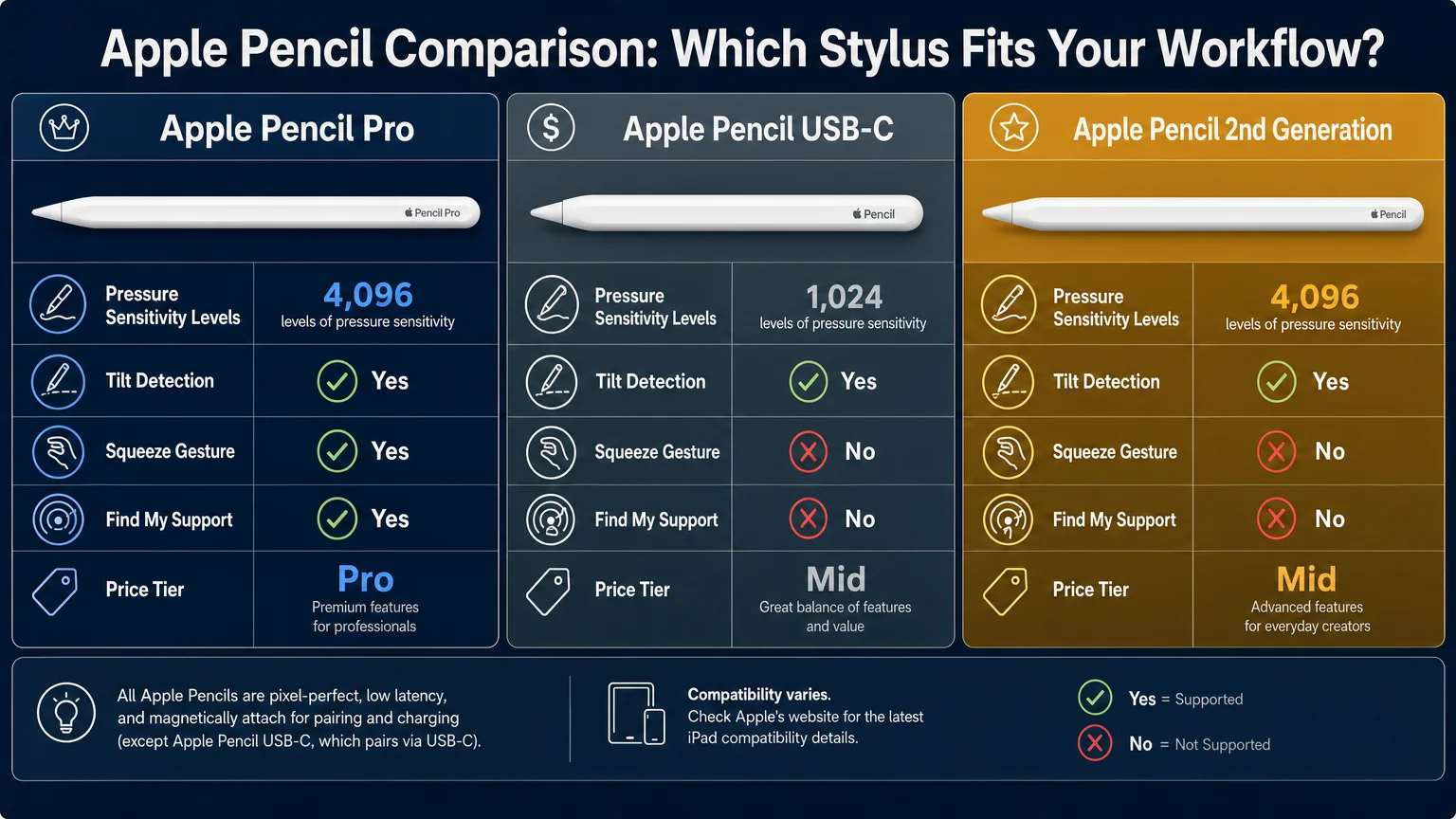
The Apple Pencil (USB-C), priced at $79, is a competent option for annotators, note-takers, and anyone on a tighter budget. It lacks pressure sensitivity on the first generation, but the second-generation USB-C model (also $79 as of late 2024) adds basic pressure and tilt. The original Apple Pencil 2nd Generation still works on older iPad Pro models (pre-M4) and iPad mini 6, so check your device’s compatibility before assuming the Pro model will attach.
Quick compatibility reference:
| Pencil Model | Compatible Devices | Pressure & Tilt | Barrel Roll | Price |
|---|---|---|---|---|
| Apple Pencil Pro | iPad Pro M4, iPad Air M2+ | Yes | Yes | $129 |
| Apple Pencil 2nd Gen | iPad Pro 2018–2022, iPad Air 4–5, iPad mini 6 | Yes | No | $129 |
| Apple Pencil USB-C (2nd Gen) | iPad 10th Gen, iPad mini 7, iPad Air M2+ | Yes | No | $79 |
Third-party options from Logitech (Crayon) and Adonit remain viable for educators and annotation-heavy workflows but do not match the Pencil Pro for fine art or illustration.
Is the Magic Keyboard Worth It for iPad Creative Work?
For professionals who split time between drawing and writing — think UX designers, content creators, and architects drafting proposals — the Magic Keyboard for iPad Pro is a genuine productivity tool. The built-in trackpad handles cursor precision well enough that many users report needing an external mouse far less than expected. The aluminum construction matches the iPad Pro’s build quality, and the function row added in the 2024 revision addresses one of the most common complaints from power users.
The honest limitation: it is expensive ($299–$349 depending on size), and it adds meaningful weight to a device people often choose for its portability. If you primarily use the iPad as a drawing tablet and only occasionally type, a lighter third-party keyboard — Logitech’s Combo Touch, for example — may serve better at roughly half the price.
For those building a focused writing environment alongside creative work, the principles in How to Build a Distraction-free Writing Workflow on Mac translate surprisingly well to iPadOS with the right keyboard setup.
What USB-C Hub or Dock Do Creative Professionals Actually Need?
A USB-C hub is where iPad Pro’s professional potential either opens up or stalls. The iPad Pro M4 supports Thunderbolt 4, which means it can drive an external display at up to 6K resolution and handle fast NVMe storage simultaneously — but only with the right hub or dock.
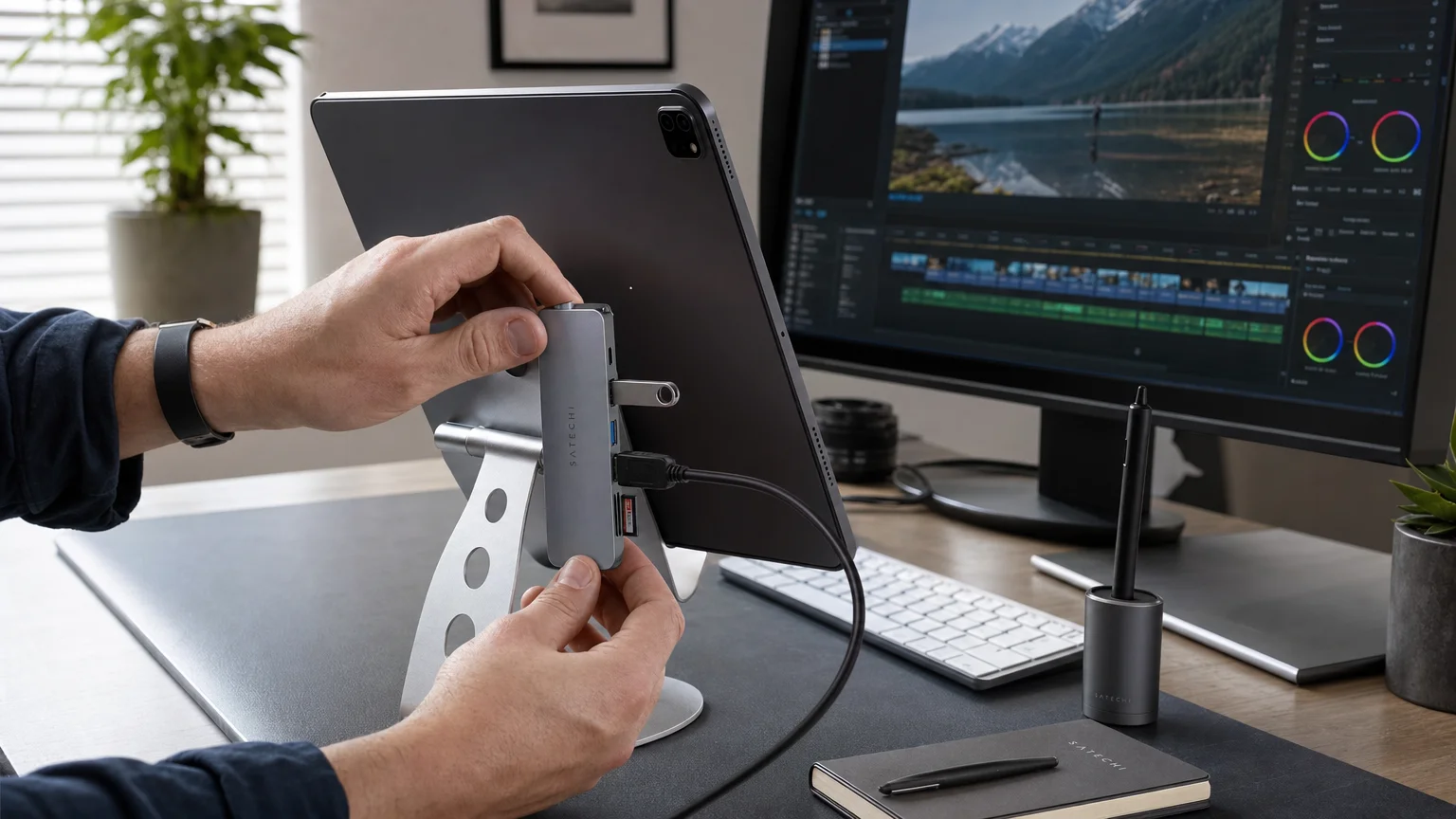
For most creative professionals, a 7-in-1 or 9-in-1 USB-C hub covering HDMI 2.0 (or DisplayPort), USB-A, USB-C data, SD/microSD, and pass-through charging covers 90 percent of studio needs. Brands like CalDigit, Anker, and Satechi all produce reliable options in the $60–$120 range. The CalDigit TS4 Thunderbolt 4 dock ($250+) is the premium choice for those running a full desk setup with external storage arrays and pro monitors.
What to look for:
- Thunderbolt 4 or USB4 passthrough for full-resolution external display support on iPad Pro M4
- SD and microSD slots (essential for photographers and videographers)
- At least one USB-A port for legacy peripherals
- Power delivery of 60W or higher so the hub charges the iPad while in use
- Compact form factor if the hub travels with the iPad
Avoid no-brand hubs with vague spec sheets — they frequently throttle data speeds or fail to sustain display output during intensive tasks.
Which Screen Protectors and Stands Make the Most Difference?
Matte screen protectors — specifically paper-texture options from brands like Paperlike and Benks — are among the highest-value accessories for illustrators and sketchers. They add friction that mimics drawing on paper, reduce glare in bright environments, and protect the display from the micro-scratches an Apple Pencil tip eventually causes. The tradeoff is a slight reduction in display brightness and color vibrancy, which matters for color-critical photography work. In that case, a standard tempered glass protector preserves display accuracy better.
Stands deserve more attention than they typically receive. A fixed-angle Smart Folio case is fine for casual use, but professionals working in extended drawing sessions benefit from an adjustable aluminum stand (Twelve South’s ParcSlope and Lululook’s foldable stand are well-regarded) that allows the iPad to sit at a comfortable drafting angle. Studio arm mounts — the kind that clamp to a desk — free the surface entirely and allow the iPad to be positioned like a Cintiq alternative.
For teams evaluating a full hardware transition, the experience documented in How a 10-person Design Studio Moved to Apple Silicon includes practical notes on stand and peripheral setups that scaled across multiple workstations.
What Audio Accessories Work Best for Creative Professionals Using iPad?
Audio needs vary sharply by discipline. Video editors and music producers need accurate headphone monitoring; illustrators and designers often just want reliable wireless audio that does not interrupt focus.
AirPods Pro (2nd generation) remain the most convenient option for iPad users already in the Apple ecosystem — Adaptive Audio and seamless device switching are genuinely useful when moving between iPad and Mac. For critical listening, Sony WH-1000XM5 and Apple’s own AirPods Max provide the isolation and frequency accuracy that mixing and sound design demand. Neither is iPad-exclusive, but both pair without friction.
Bluetooth speakers are worth considering for studio environments where earphones become fatiguing. The Sonos Era 100 and UE Hyperboom both integrate well with iPadOS audio routing.
Are There Accessories Specific to iPad Pro M4 That Older Models Cannot Use?
Yes, and this is a common source of buyer frustration. The iPad Pro M4 (2024) introduced a thinner chassis that is incompatible with Magic Keyboards designed for earlier iPad Pro models. The Apple Pencil Pro requires an iPad Pro M4 or iPad Air M2 or later — it will not work with iPad Pro 2022 or older. Thunderbolt 4 hub features (high-resolution external display, fast NVMe) are exclusive to iPad Pro M4 and the iPad Pro 2022 (M2).
Before purchasing any accessory marketed for “iPad Pro,” verify the specific generation compatibility on Apple’s support pages or the retailer’s spec sheet. This applies to cases, keyboards, and hubs alike.
Conclusion
The best iPad accessories for creative professionals in 2025 are not the most expensive ones — they are the ones matched to a specific workflow. An illustrator needs Apple Pencil Pro and a matte screen protector above all else. A photographer or videographer needs a reliable USB-C hub with SD card support and a Thunderbolt-capable dock for desk work. A designer who writes as much as they draw needs the Magic Keyboard.
Start with the one accessory that addresses your biggest current friction point, verify compatibility with your specific iPad model, and build from there. For a broader look at how Apple’s hardware ecosystem fits together for professional teams, the analysis in How a 10-person Design Studio Moved to Apple Silicon is worth reading alongside this guide.
Frequently Asked Questions
Does Apple Pencil Pro work with iPad Air?
Apple Pencil Pro is compatible with iPad Air M2 and iPad Air M3 (2024 and later). It does not work with earlier iPad Air models. Always check Apple's compatibility chart before purchasing.
Can iPad Pro M4 connect to an external monitor for color-graded video work?
Yes. iPad Pro M4 supports Thunderbolt 4 and can drive a single external display at up to 6K resolution via a compatible hub or direct USB-C connection. Apps like Final Cut Pro and DaVinci Resolve support extended display output on iPadOS.
Is the Magic Keyboard for iPad Pro compatible with older iPad Pro models?
No. Apple redesigned the Magic Keyboard for the thinner iPad Pro M4 (2024), and it is not backward-compatible with iPad Pro 2022 or earlier. The previous Magic Keyboard generation fits iPad Pro 2018–2022 models.
What is the best screen protector for illustrators using Apple Pencil?
Paperlike and Benks matte/paper-texture protectors are the most popular among illustrators for their pencil-like friction. They reduce glare but slightly dim the display. For color-accurate photography work, a standard tempered glass protector is preferable.
Do third-party Apple Pencil alternatives support pressure sensitivity on iPad Pro?
Most third-party styluses, including the Logitech Crayon, support basic pressure sensitivity on compatible iPads but do not match the full range of Apple Pencil Pro features such as barrel roll, hover detection, or squeeze gestures. They are adequate for annotation but limited for professional illustration.
How much power delivery does a USB-C hub need to charge iPad Pro while in use?
At minimum, 45W pass-through charging keeps an iPad Pro M4 from draining during intensive tasks. 60W or higher is recommended for sustained use with external displays and storage connected simultaneously.
Can I use a USB-C hub with iPad Air as well as iPad Pro?
Yes. Most USB-C hubs work with both iPad Air and iPad Pro. However, Thunderbolt 4 features (such as 6K display output) are exclusive to iPad Pro M4. iPad Air M2/M3 supports USB 3 speeds and standard HDMI output through a hub.
Founder and editor of We Are MacWise, with more than 30 years of Apple-focused IT experience helping professionals and small businesses.
