
Founder and editor of We Are MacWise, with more than 30 years of Apple-focused IT experience helping professionals and small businesses.
More than 80 percent of confirmed data breaches involve weak or reused passwords, according to Verizon’s Data Breach Investigations Report. For anyone living inside the Apple ecosystem — across Mac, iPhone, and iPad — choosing the right password manager is one of the highest-return security decisions available. This guide covers the best password managers for Apple users in 2025, with honest assessments of what each tool does well, where it falls short, and who it actually suits.
Key Takeaways
- iCloud Keychain is free, deeply integrated, and sufficient for many casual users — but it has real limitations for power users and cross-platform households.
- 1Password remains the gold standard for Apple professionals and teams who need advanced features and polished design.
- Bitwarden is the best open-source option and the strongest choice for budget-conscious users who still want serious security.
- Dashlane and Keeper are credible alternatives with distinct strengths in dark-web monitoring and enterprise management respectively.
- All five managers reviewed here support Face ID, Touch ID, and Safari AutoFill on Apple devices.
- Paying for a premium password manager typically costs less than $4 per month — a reasonable price for the protection it provides.
- Family and team plans offer the best per-person value for households and small businesses.
What Makes a Password Manager Good for Apple Users?
The best password managers for Apple users share a specific set of qualities that go beyond basic functionality. Deep Safari integration, reliable iCloud sync, Face ID and Touch ID support, and a native app experience on macOS and iOS are non-negotiable starting points.
Beyond those basics, the meaningful differentiators are: how well the app handles passkeys (Apple’s preferred replacement for passwords), whether it syncs across non-Apple devices for mixed households, how the sharing model works for families and teams, and whether the security architecture has been independently audited. A password manager that feels clunky on iPhone or requires too many manual steps will simply not get used — and an unused security tool provides no protection at all.
How Does iCloud Keychain Compare to Third-Party Apps?
iCloud Keychain is built into every Apple device and costs nothing. It generates strong passwords, autofills in Safari, syncs across all devices signed into the same Apple ID, and now supports passkeys natively. For a single-device user who stays entirely within Apple’s ecosystem, it handles the fundamentals well.
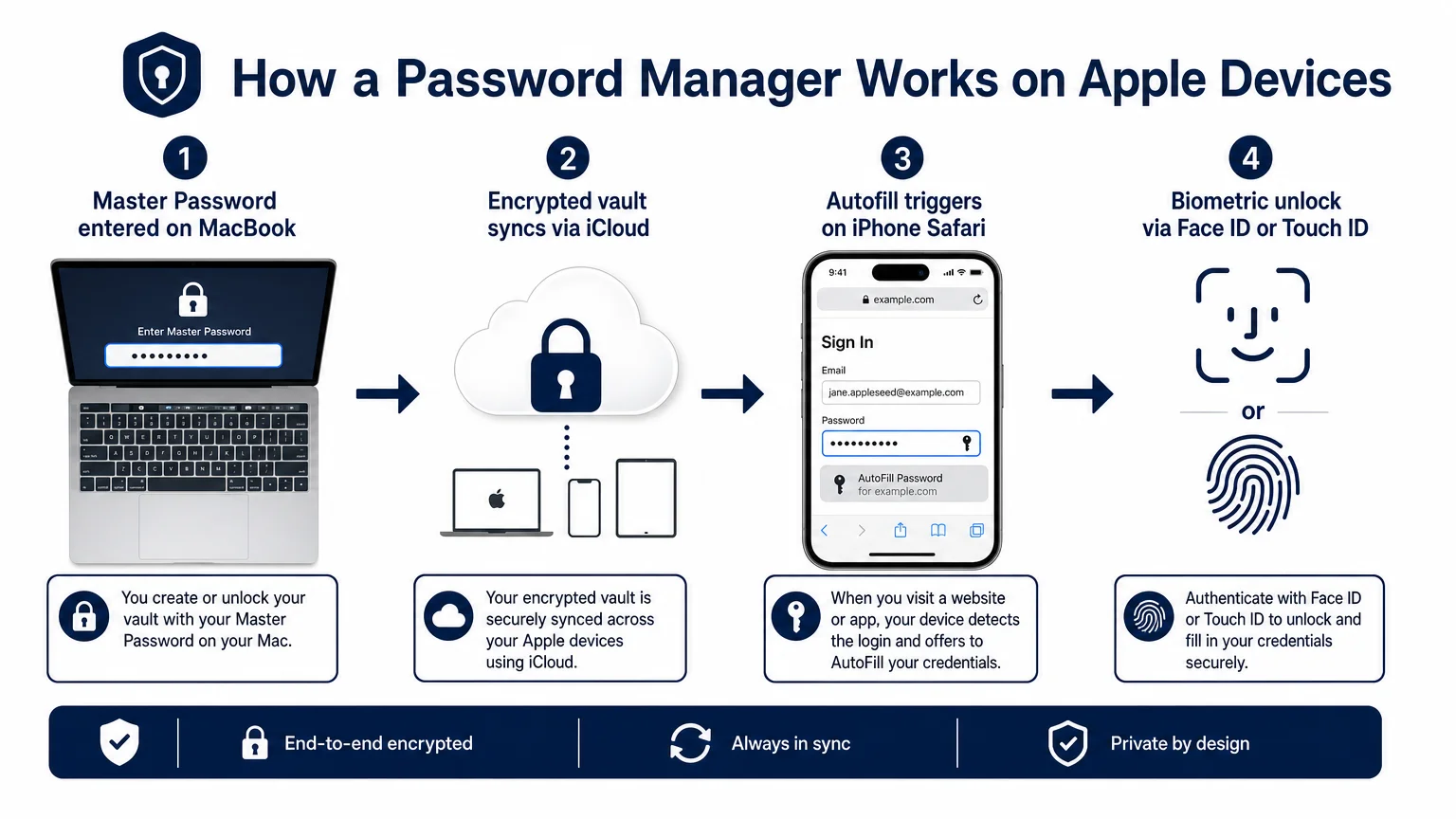
The limitations become apparent quickly. iCloud Keychain has no standalone app with a searchable vault, no secure notes with rich formatting, no travel mode, no family-sharing vault with granular permissions, and no meaningful support for Windows or Android. If anyone in your household uses a non-Apple device — or if you need to share credentials with a colleague who doesn’t use Apple — iCloud Keychain creates friction. It is a solid baseline, not a complete solution.
Which Password Managers Are Worth Paying For?
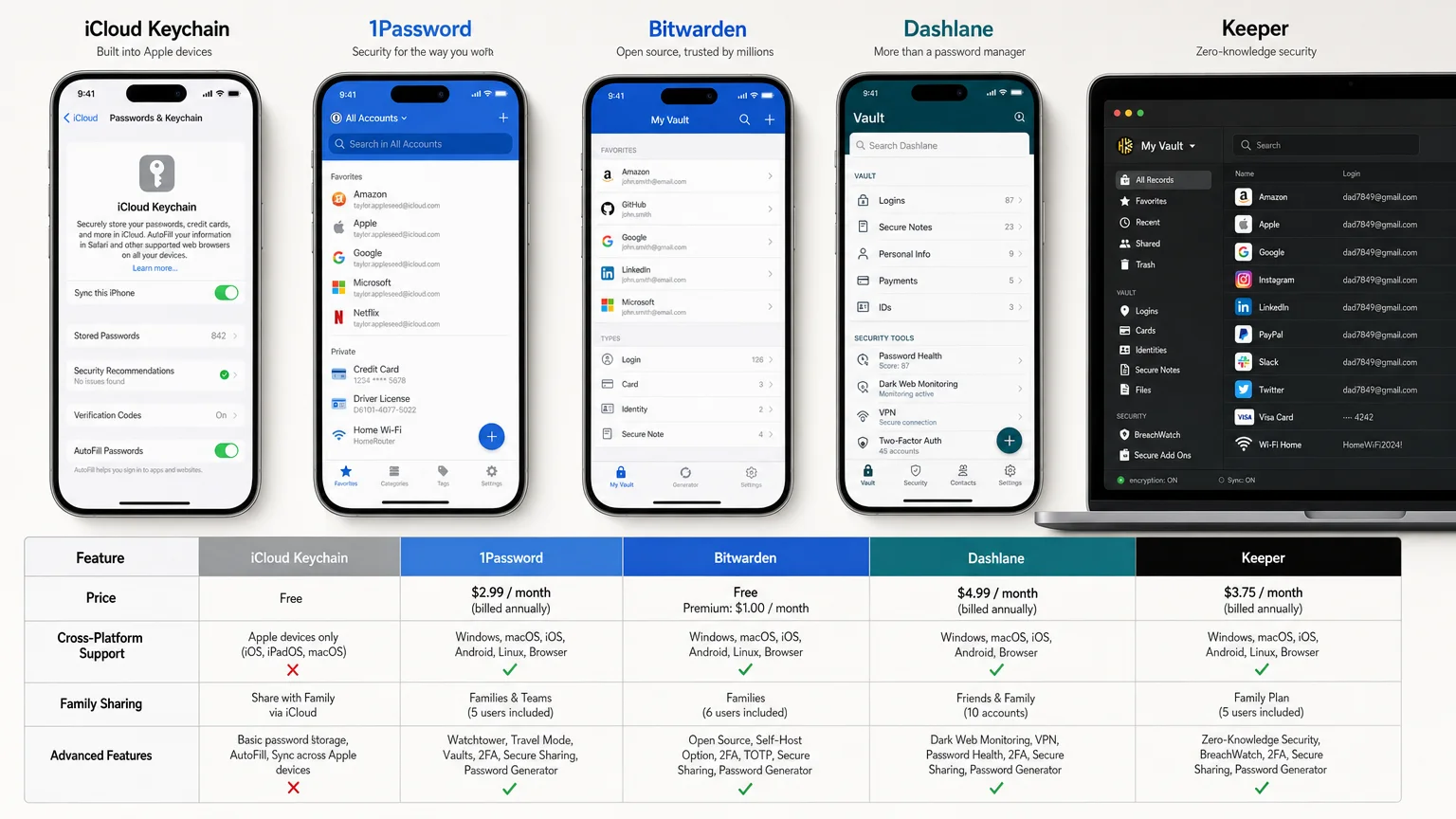
Several third-party options have earned genuine trust among Apple users. Here is a direct comparison of the strongest contenders.
| Manager | Starting Price | Apple-Native App | Cross-Platform | Passkey Support | Standout Feature |
|---|---|---|---|---|---|
| iCloud Keychain | Free | Yes | Apple only | Yes | Zero cost, deep integration |
| 1Password | $2.99/mo | Yes | Yes | Yes | Travel Mode, Watchtower |
| Bitwarden | Free / $10/yr | Yes | Yes | Yes | Open-source, audited |
| Dashlane | $4.99/mo | Yes | Yes | Yes | Dark-web monitoring |
| Keeper | $2.92/mo | Yes | Yes | Yes | Enterprise management |
1Password is the most polished third-party option for Apple users. Its Mac and iOS apps feel genuinely native, the Watchtower feature flags compromised or weak passwords proactively, and Travel Mode — which hides designated vaults when crossing borders — is uniquely useful for frequent travelers. The family plan covers up to five people and includes a shared family vault with sensible permission controls. The main drawback is price: it is not the cheapest option, and the free tier was discontinued years ago.
Bitwarden is the strongest argument for open-source security. The code is publicly audited, the free tier is genuinely useful (not artificially crippled), and the premium individual plan costs $10 per year — a figure that is difficult to argue with. The iOS and Mac apps are functional rather than beautiful, and the user experience lacks the refinement of 1Password, but the security fundamentals are sound.
Dashlane differentiates itself with real-time dark-web monitoring included in paid plans — a feature that alerts users when their credentials appear in known data breaches. The interface is clean and the autofill is reliable, but the pricing is higher than competitors and the desktop app moved to a web-based model, which some users find less convenient.
Keeper is worth considering for small businesses and IT administrators. Its admin console, role-based access controls, and compliance reporting tools go well beyond what consumer-focused managers offer. For a ten-person creative studio or consulting practice, Keeper Business provides meaningful oversight that iCloud Keychain and even 1Password cannot match.
What Should Apple Professionals and Small Teams Use?
For Apple professionals — consultants, designers, developers, small-business owners — the calculus shifts toward team features, auditability, and reliability under pressure. A solo consultant who travels internationally should look seriously at 1Password’s Travel Mode and its business plan, which includes document storage and activity logs. A small creative team will benefit from 1Password Teams or Keeper Business, both of which allow administrators to provision and revoke access without touching individual employees’ personal vaults.
If you are in the process of setting up new devices for a team, the guidance in How to Set Up a New iPhone the Right Way From Day One pairs well with establishing a shared password manager from the start — it is far easier to build good habits during setup than to retrofit them later.
For teams that have recently moved to Apple Silicon Macs, the native performance of 1Password and Bitwarden on M-series chips is noticeably better than it was under Rosetta 2. The piece on how a 10-person design studio moved to Apple Silicon covers the broader transition, and password manager compatibility was one of the smoother parts of that shift.
How Does Passkey Support Change the Picture?
Passkeys are cryptographic credentials that replace passwords entirely — they are phishing-resistant, cannot be leaked in a database breach, and authenticate using Face ID or Touch ID. Apple built passkey support into iCloud Keychain first, and third-party managers have been catching up through 2024 and into 2025.
1Password, Bitwarden, and Dashlane all support storing and autofilling passkeys as of their current versions. This matters because iCloud Keychain’s passkey support is tied to your Apple ID — if you ever need to share a passkey with a colleague or access it on a Windows machine, you cannot. Third-party managers that support passkeys give users more flexibility as the standard matures.
For a broader look at how Apple’s privacy architecture fits together, iPhone Privacy Settings Every User Should Review Right Now is a practical companion read.
Are Free Password Managers Enough?
For a single user with a modest number of accounts who stays entirely within Apple’s ecosystem, iCloud Keychain plus Bitwarden’s free tier covers most real-world needs without spending anything. The combination is not elegant — managing two vaults creates its own friction — but it is a legitimate option for users who are not yet ready to commit to a paid subscription.
The honest answer for most people, though, is that the paid tier of a well-chosen manager is worth the cost. The difference between a free and premium plan typically unlocks secure sharing, emergency access, priority support, and advanced monitoring — features that matter most precisely when something goes wrong.
The Bottom Line
The best password manager for Apple users in 2025 depends on how you use your devices, who you share credentials with, and how much complexity you are willing to manage. iCloud Keychain is the right starting point for anyone who has never used a dedicated manager. 1Password is the right upgrade for professionals and families who want a polished, full-featured experience. Bitwarden is the right choice for users who prioritize open-source transparency and low cost. Dashlane and Keeper serve specific needs — breach monitoring and enterprise control, respectively — that justify their pricing for the right audience.
Security decisions compound over time. Choosing a well-designed password manager now, and actually using it consistently, is one of the most straightforward steps available for protecting your digital life across every Apple device you own.
For more on building a secure Apple setup, explore iPhone Privacy Settings Every User Should Review Right Now — or subscribe to We Are MacWise for ongoing coverage of the tools and practices that matter most to Apple users.
Frequently Asked Questions
Is iCloud Keychain secure enough for most users?
iCloud Keychain uses AES-256 encryption and is protected by your Apple ID and device passcode. For most individual users who stay within the Apple ecosystem, it provides solid baseline security. It lacks advanced features like secure sharing, travel mode, and cross-platform support, which matter more as your needs grow.
Can I use a third-party password manager alongside iCloud Keychain?
Yes. Apple allows third-party password managers to serve as the default AutoFill provider in iOS and macOS settings. You can disable iCloud Keychain's AutoFill and route everything through 1Password or Bitwarden, or run both simultaneously — though managing two vaults adds complexity.
Which password manager is best for a family with mixed Apple and Android devices?
1Password and Bitwarden both offer strong cross-platform support and family plans. Bitwarden's family plan is the most affordable. iCloud Keychain is not a practical option for households with Android or Windows devices.
Does switching password managers mean re-entering all my passwords?
No. Most managers — including 1Password, Bitwarden, and Dashlane — can import directly from iCloud Keychain via a CSV export, or from each other. The process takes under an hour for most users.
What is Travel Mode and do I need it?
Travel Mode is a 1Password feature that temporarily hides designated vaults from your device. When crossing a border where device searches are possible, sensitive credentials become inaccessible even if someone has your device and passcode. It is a niche feature, but genuinely useful for frequent international travelers.
How often should I audit my saved passwords?
A quarterly review is a reasonable cadence for most users. Tools like 1Password's Watchtower or Dashlane's breach monitoring automate much of this by flagging weak, reused, or compromised passwords in real time.
Are password managers safe from being hacked themselves?
No software is immune to attack, but reputable password managers use zero-knowledge architecture — meaning the provider cannot see your vault contents even if their servers are compromised. Bitwarden's open-source code and independent audits make its architecture particularly transparent. Always enable two-factor authentication on your password manager account itself.
Founder and editor of We Are MacWise, with more than 30 years of Apple-focused IT experience helping professionals and small businesses.
