
Founder and editor of We Are MacWise, with more than 30 years of Apple-focused IT experience helping professionals and small businesses.
When Apple introduced App Tracking Transparency with iOS 14.5 in April 2021, it forced a permission prompt onto every app that wanted to track users across other companies’ apps and websites. The advertising industry called it catastrophic. Privacy advocates called it overdue. Five years later, it remains one of the most consequential privacy features Apple has ever shipped — and one of the most misunderstood.
This article explains how App Tracking Transparency actually works at a technical level, what it genuinely protects against, and where its limits lie.
Quick Answer
App Tracking Transparency (ATT) requires apps to ask your explicit permission before accessing your iPhone’s Identifier for Advertisers (IDFA), the unique device ID that ad networks use to build profiles and target you across apps. If you deny permission, the IDFA is zeroed out and unavailable to that app. ATT does not block all data collection — it specifically controls cross-app and cross-site tracking via the IDFA.
Key Takeaways
- ATT was introduced in iOS 14.5 (April 2021) and applies to all apps distributed through the App Store.
- The core mechanism is controlling access to the IDFA — a unique, resettable identifier Apple assigns to each device.
- Denying tracking zeroes out the IDFA for that app; it cannot be used to link your behavior across different companies’ products.
- ATT does not prevent apps from collecting data within their own ecosystem (first-party data).
- Fingerprinting — using device attributes like screen size, language, and IP address to identify users — is explicitly prohibited by Apple’s guidelines but technically harder to enforce.
- Apple’s SKAdNetwork provides a privacy-preserving alternative for advertisers to measure campaign performance without individual-level tracking.
- As of 2026, ATT enforcement applies on iPhone, iPad, Apple TV, and Mac apps distributed through the App Store.
- Users can review and change ATT decisions at any time in Settings → Privacy & Security → Tracking.
What Is the IDFA and Why Does It Matter?
The Identifier for Advertisers is a random alphanumeric string Apple assigns to each device. Unlike a hardware serial number, it is designed to be resettable — users have always been able to reset it manually, but before ATT, apps could read it freely without asking.
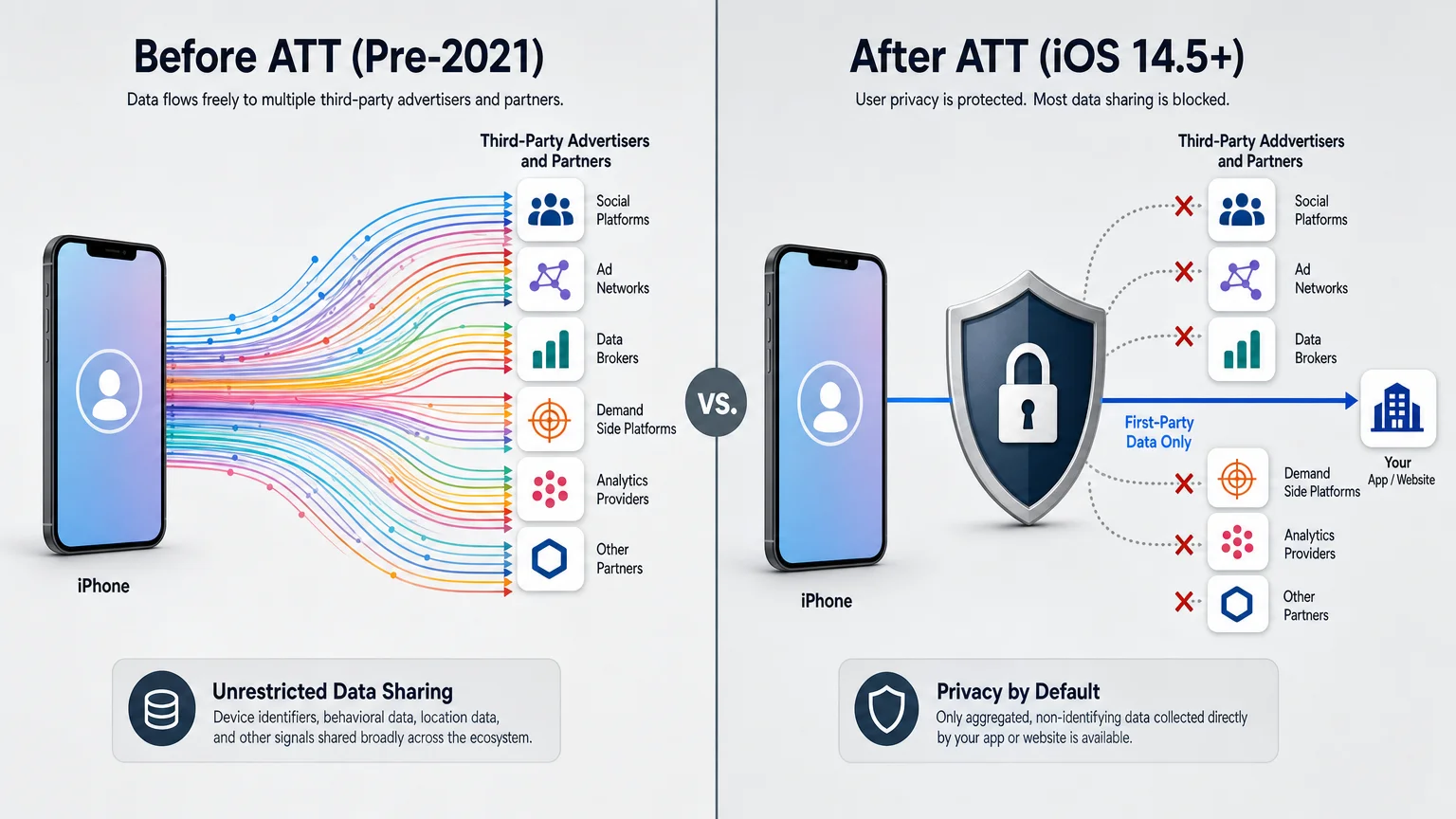
Ad networks used the IDFA to stitch together a picture of your behavior across completely unrelated apps. Open a fitness app, browse a shoe retailer, check a news aggregator — all three could report your IDFA to the same ad exchange, which would then build a unified behavioral profile. That profile is what enables the uncanny experience of seeing an ad for something you searched for in one app appear inside a completely different one.
ATT broke that pipeline by making IDFA access opt-in. When you deny permission, the app receives a zeroed-out string (00000000-0000-0000-0000-000000000000) instead of your real identifier. Without a consistent ID, cross-app profile building becomes dramatically harder.
How the ATT Permission Prompt Actually Works
Every app that wants to track you across other companies’ apps or websites must display a system-level ATT prompt before attempting to access the IDFA. This prompt is generated by iOS itself — the app cannot customize its wording beyond a single purpose string the developer writes.
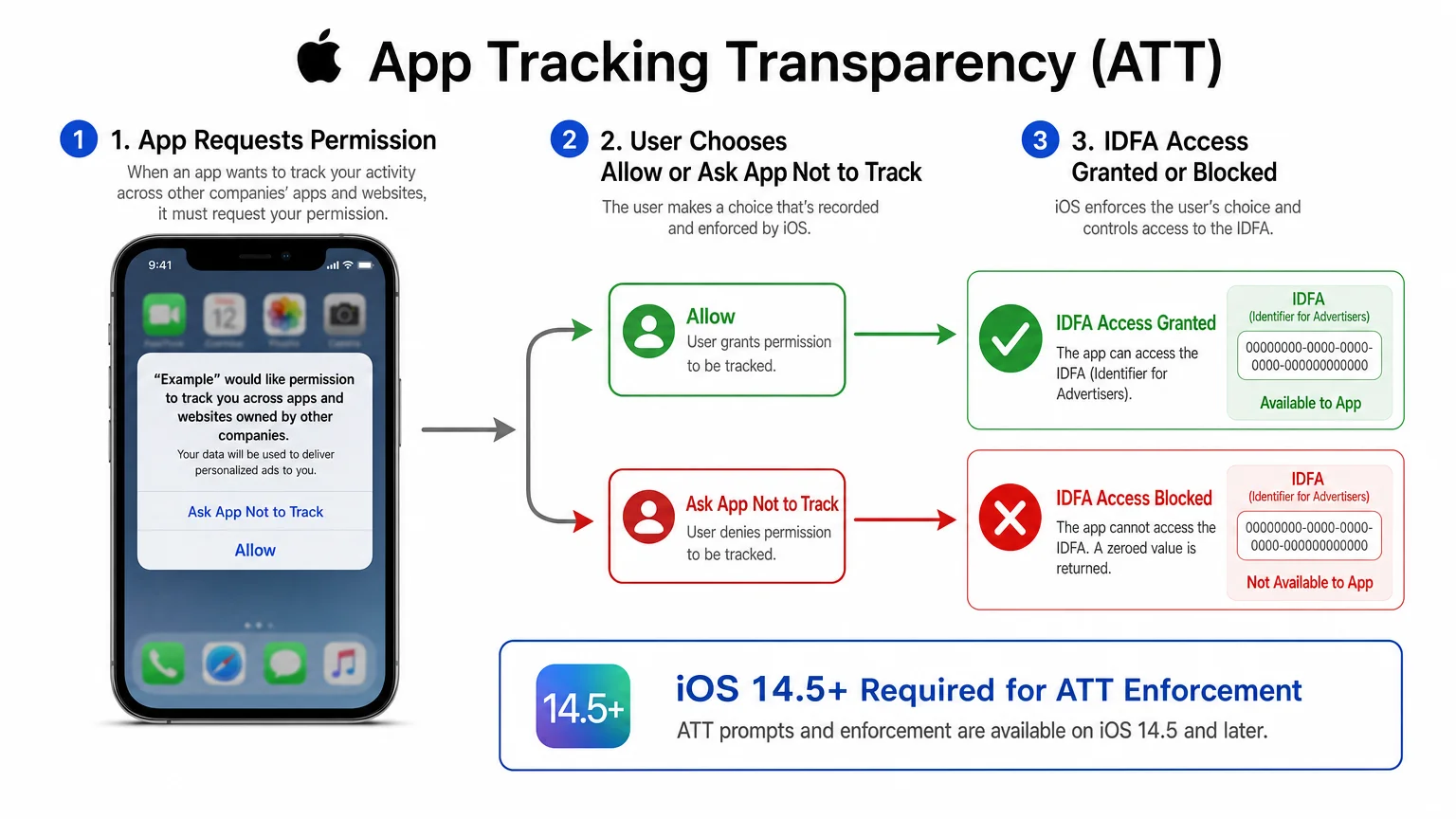
The prompt reads: “[App Name] would like permission to track you across apps and websites owned by other companies.” Below that, the developer’s purpose string explains why. Users tap either “Allow Tracking” or “Ask App Not to Track.”
Apple’s rules are explicit: apps cannot show a pre-prompt screen designed to pressure users into allowing tracking, cannot withhold features as punishment for denying, and cannot use other means (such as device fingerprinting) to circumvent the decision. Violations can result in App Store rejection or removal.
Developers must declare in App Store Connect that their app uses tracking before the prompt will even appear. Apps that fail to declare this and are caught tracking anyway face policy enforcement.
What ATT Blocks — and What It Doesn’t
Understanding ATT’s actual scope prevents both overconfidence and unnecessary dismissal of its value.
What ATT effectively restricts:
- Access to the IDFA for cross-company tracking
- Sharing your IDFA with third-party data brokers and ad networks
- Linking your behavior in App A to your behavior in App B when they are owned by different companies
What ATT does not restrict:
- First-party data collection within a single company’s apps (Meta can still track you across Facebook, Instagram, and WhatsApp because those are all Meta properties)
- Contextual advertising that doesn’t rely on individual identifiers
- Server-side data collection (apps can still log events on their own servers)
- Probabilistic fingerprinting — though Apple prohibits it, enforcement relies on App Store review rather than a technical block
The distinction between first-party and third-party tracking is significant. A company with multiple apps under one developer account is not required to ask for ATT permission to track users across its own products. This is why large platform companies retained substantial targeting capability even after iOS 14.5.
For a broader look at the privacy controls available on iPhone, the iPhone privacy settings every user should review right now guide covers the full range of options worth configuring.
How SKAdNetwork Replaced the IDFA for Ad Measurement
Apple anticipated that advertisers would need some way to measure whether their campaigns were working — just without individual-level tracking. The answer is SKAdNetwork, a framework Apple introduced and has iterated on since ATT launched.
SKAdNetwork works by having Apple itself act as an intermediary. When a user installs an app after seeing an ad, the install signal is sent to Apple, which aggregates it and reports back to the advertiser with a privacy-preserving conversion value — but without identifying the individual user. The data is delayed and anonymized to prevent reverse-engineering of individual behavior.
By 2026, SKAdNetwork has gone through multiple versions, with Apple adding support for more granular conversion windows and web-to-app attribution. It is not a perfect replacement for IDFA-based measurement — campaign optimization is less precise, attribution windows are constrained — but it gives advertisers a legitimate path to understanding aggregate campaign performance.
This shift pushed the advertising industry toward contextual targeting (showing ads based on what you’re reading rather than who you are) and toward building larger first-party data sets directly from consented user relationships.
Does ATT Actually Improve Your Privacy?
The honest answer is: meaningfully, but not completely. Research published after ATT’s launch found significant reductions in the number of third-party trackers receiving IDFA data across the app ecosystem. Opt-in rates for tracking hovered well below 50% globally in most studies, meaning the majority of users were effectively opting out of IDFA-based cross-app tracking.
What ATT cannot address is the broader ecosystem of behavioral inference. Apps still collect substantial data — purchase history, location (with separate permission), search terms, browsing behavior within the app — and that data can be shared in ways that don’t require the IDFA. Probabilistic fingerprinting, while prohibited, remains a real concern because it is difficult to detect at the App Store review stage.
For users who have also configured their iPhone privacy settings carefully — limiting location access, disabling unnecessary background app refresh, and reviewing which apps have access to contacts and photos — ATT is one meaningful layer in a broader privacy posture, not a complete solution on its own.
How to Review and Change Your ATT Decisions
You can see every app that has requested tracking permission and change your decision at any time:
- Open Settings
- Tap Privacy & Security
- Tap Tracking
- Toggle individual apps on or off, or disable the “Allow Apps to Request to Track” master switch to block all future requests automatically
Turning off the master switch means no app will be able to show you the ATT prompt — they will all be treated as denied by default. This is the most restrictive option and appropriate for users who want to minimize cross-app tracking without reviewing each app individually.
ATT in 2026: What Has Changed Since Launch
Apple has continued tightening ATT enforcement. Fingerprinting prohibitions have been reiterated in updated developer guidelines. The App Store review process has added automated checks for declared tracking usage. SKAdNetwork has matured into a more capable (if still limited) measurement tool.
The broader regulatory environment has also shifted. The EU’s Digital Markets Act and various national privacy laws have created additional obligations for large platforms, complementing what ATT does at the OS level. Apple has had to navigate tensions between ATT’s privacy framing and its own advertising business — a dynamic that has drawn regulatory scrutiny in some markets.
For teams evaluating Apple’s broader approach to on-device intelligence and privacy, the analysis of how Apple Intelligence actually works — and where it falls short covers how Apple’s ML features handle data in ways that extend the same privacy-by-design philosophy.
ATT vs. Other Platform Privacy Controls: A Quick Comparison
| Feature | Apple ATT (iOS) | Android Ad ID Controls | Browser-Based Controls |
|---|---|---|---|
| Requires explicit opt-in | Yes | No (opt-out model) | Varies by browser |
| System-level enforcement | Yes | Partial | No |
| Covers cross-app tracking | Yes | Partial | No (web only) |
| Covers fingerprinting | Policy only | Policy only | No |
| Privacy-preserving ad measurement | SKAdNetwork | Privacy Sandbox | Various proposals |
The opt-in vs. opt-out distinction is significant. Apple’s model defaults to privacy; users must actively choose to allow tracking. Android’s historical model required users to seek out and enable the opt-out. Google has been moving toward its own Privacy Sandbox approach, but the default posture differs.
Conclusion
App Tracking Transparency is a genuine structural change to how cross-app advertising works on Apple devices — not marketing. By making IDFA access opt-in and requiring explicit permission for cross-company tracking, Apple shifted the default from surveillance to privacy. Its limits are real: first-party data collection continues, fingerprinting remains a policy rather than a technical prohibition, and large platforms with multiple apps retained significant reach. But for the majority of users who deny tracking requests, the practical reduction in cross-app profile building is meaningful.
For a complete picture of how to configure your iPhone’s privacy settings beyond ATT, the iPhone privacy settings every user should review right now guide is a practical next step. And if you’re setting up a new device and want to configure privacy from the start, the walkthrough on how to set up a new iPhone the right way from day one covers the full setup process with privacy in mind.
Frequently Asked Questions
Does denying ATT permission stop all data collection from an app?
No. Denying ATT permission blocks the app from accessing your IDFA and using it for cross-company tracking. The app can still collect data about your behavior within its own product and on its own servers. ATT is specifically about cross-app, cross-company tracking via the device identifier.
Can apps still track me if I deny the ATT prompt?
Apps are prohibited from using fingerprinting or other technical workarounds to track you after you deny ATT. However, Apple's enforcement is policy-based rather than a complete technical block, so some bad actors may attempt fingerprinting. Choosing reputable apps from established developers reduces this risk.
What happens if I never see an ATT prompt from an app?
Some apps do not engage in third-party tracking and therefore never show the prompt. Others may have failed to declare tracking usage in App Store Connect — which is a policy violation. If you want to verify, check Settings → Privacy & Security → Tracking to see which apps have requested permission.
Does ATT apply to Apple's own apps?
Apple's own apps do not track users across third-party apps and websites in the way ATT governs, so you will not see ATT prompts from Apple's native apps. Apple does use data from its own ecosystem for its advertising products, but this falls under first-party data use rather than cross-company tracking.
Can I reset my IDFA even if I've allowed tracking for some apps?
Yes. Going to Settings → Privacy & Security → Tracking and toggling "Allow Apps to Request to Track" off and back on will effectively reset your tracking decisions. You can also reset the IDFA itself through the same menu. Apps that previously had permission will need to request it again.
Does ATT work on iPad and Mac, not just iPhone?
Yes. ATT applies to all App Store apps across iPhone, iPad, Apple TV, and Mac (apps distributed through the Mac App Store or using the App Store framework). The same permission requirement and IDFA controls apply across platforms.
What is SKAdNetwork and do I need to do anything to use it?
SKAdNetwork is Apple's privacy-preserving ad measurement framework for advertisers — it operates entirely on the backend and requires no action from users. It allows advertisers to receive aggregated, anonymized install and conversion data without accessing individual user identifiers.
Founder and editor of We Are MacWise, with more than 30 years of Apple-focused IT experience helping professionals and small businesses.
